Farm & Feast Guides
From the first closed morning on the plots to the last Check Please of the night.
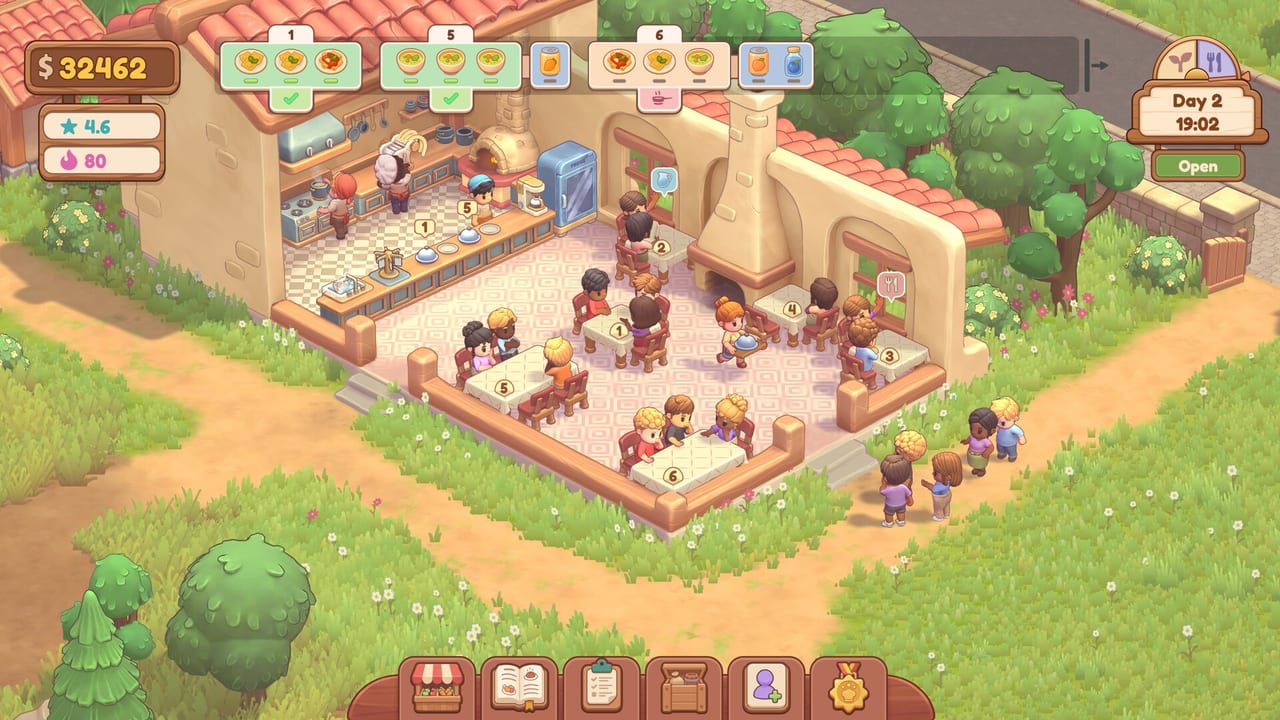
This hub is the map for every Farm & Feast how-to on the wiki. The game is a single-player cozy sim from dummy dino: you grow ingredients, cook from a recipe book, and run a six-table restaurant that sits on a dirt path between woodland plots and a small beach. Steam dates the full game for 11 Nov 2026 and already ships a free demo. Use these pages to learn the real loop instead of guessing from the store blurb.
Start with Getting Started if you have not opened the demo yet. If the demo is already installed, jump to How to Play the Demo for a closed-morning / open-evening schedule. When a mechanic feels sticky, open the specialist pages: farming and the hose, restaurant service, cooking and the menu, controls, the market, mini-games, and fishing and the beach.
What this hub covers
Farm & Feast is not a combat RPG and it is not a tycoon that runs itself. You are the farmer in the morning and the floor manager at night. Steam’s own copy spells out the arc: plant and water, greet guests, seat them, take orders with care, carry drinks, hand tickets to chefs, sweep, then take the bill. Official screenshots add the details the store text leaves out — numbered tables, a spinning fridge minigame, a water-pump timing game, a recipe book with Tomato Soup, and a market that sells dairy, seeds, and noodles in packs of five.
The guides here follow that evidence. They do not invent crop timers or hidden XP curves. When a number appears (Rigatoni at $6.14, Cream at $2.50, a $13.97 card receipt), it comes from Steam screenshots of the demo UI. When something is still unknown — exact growth minutes, full-game staff unlocks, fishing on the beach — the page says so and points you to official links.
How to use the pages together
Read in this order on a first session:
- Getting Started — install, HUD, and the day clock.
- Farming — plots, hose, water tank, pump minigame.
- Cooking — recipe book, extras, and a short menu.
- Restaurant — seating, tickets, fridge, bills, tips, stars.
- Market — what to restock before you sleep.
- Controls — keyboard Space prompts and full controller support.
- Mini-games — pump, fridge spinner, Check Please.
- Fishing — how to find the beach after Close.
After that, compare your pantry against the crop tier list and your board against the dish tier list. Keep a printed-in-your-head version of the day planner so you stop opening with an empty fridge.
Demo versus full game
Everything mechanical in these guides is written for the playable Steam demo. The full product is still upcoming on 11 Nov 2026. Dummy dino has not published a public itemised changelog for what the paid build adds. Treat locked menu slots, Upgrade tabs, and the beach as systems that exist in the demo build we can see — not as promises about launch day. When Steam news or Discord posts change a date or a feature, the updates hub will move first, then these tutorials will follow.
Search intents this hub answers
Players arriving from Google usually want one of six things: how to play, how to farm, how to take orders, how to cook Tomato Soup, how to use a controller, or how to spend money at the market. Each of those has a dedicated page. If you came here looking for Roblox codes or scripts, you are on the wrong wiki — Farm & Feast is a Steam sim, not a Roblox experience.
When you finish a guide, follow the sibling links at the bottom. Same-category pages cross-link on purpose so a farming question can land you in the market, and a billing question can land you back in cooking. That is how you keep the pantry, the menu, and the floor in the same conversation.
Frequently Asked Questions
Quick answers about the Farm & Feast demo and the 11 Nov 2026 Steam launch.
Which Farm & Feast guide should I open first?
New players should start with Getting Started. If you already booted the demo, use How to Play the Demo as a session checklist.
Are these guides for the demo or the full game?
They describe the free Steam demo. The full Farm & Feast build is dated 11 Nov 2026 on Steam. See the release-date page for the store window.
Do you invent crop names and prices?
No. Crop types, dish names, and prices quoted here come from official Steam screenshots (Tomato Soup, Rigatoni, Cream, Carrot Seed, and so on). Unknown timers stay marked as unknown.
Where are controls and accessibility notes?
The controls guide covers keyboard Space prompts, full controller support, save-anytime, and Steam's own-pace accessibility flags.