
Farm & Feast Controls
Keyboard prompts from the demo overlays, plus Steam's full controller and accessibility list.
Farm & Feast is built to be played slowly, and Steam’s own store flags underline that: full controller support, save anytime, custom volume, adjustable difficulty, playable at your own pace, playable without timed input. The last flag is about the overall game, not about the two timing toys you will still meet — the water pump and the fridge spinner. This page collects every control fact we can cite from Steam and from official screenshots. It does not invent a full keybind table dummy dino has not published.
If you have not booted the demo, read Getting Started first. If you came here because the pump overlay confused you, skip to that section, then return to farming.
Keyboard prompts we can actually see
Two overlays print keyboard language in official art.
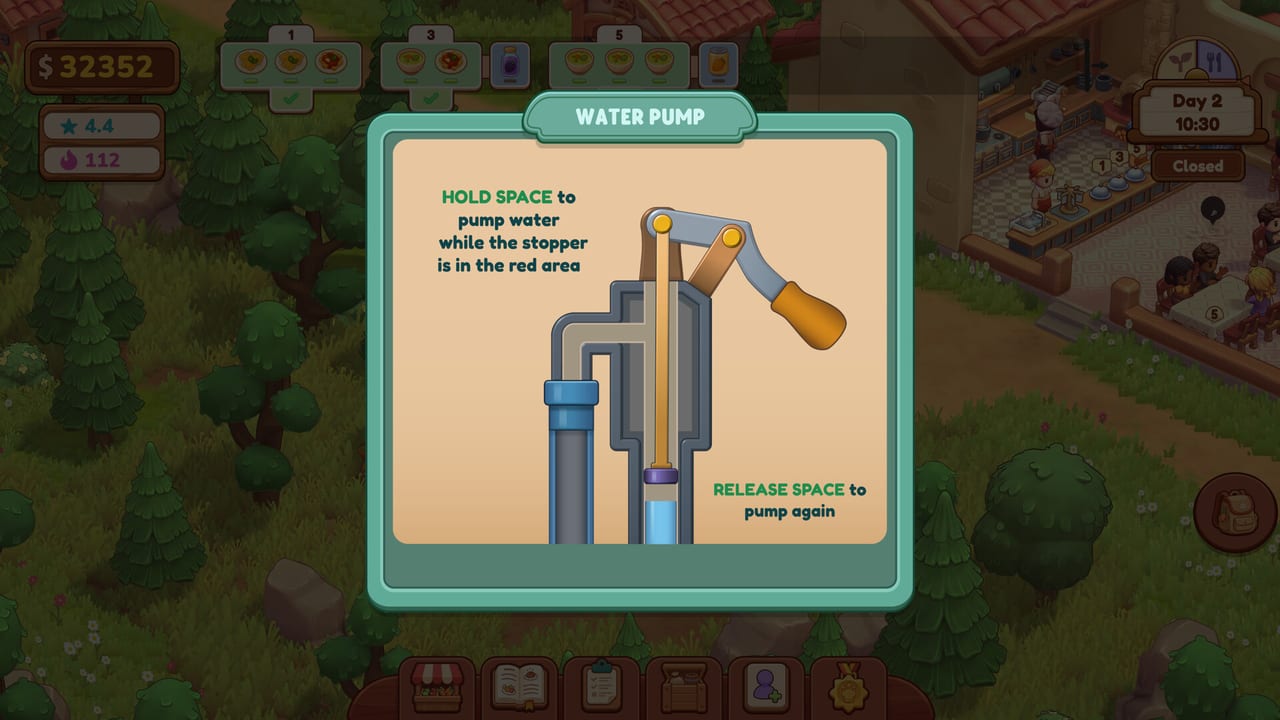
Water Pump. The panel says “HOLD SPACE to pump water while the stopper is in the red area” and “RELEASE SPACE to pump again.” That is a hold-and-release rhythm, not a mash. Watch the stopper, not the handle. Missing the red band wastes the Closed morning you meant to spend on tomatoes.
Fridge. The drink spinner shows a Cancel control labelled Esc. If you grabbed the wrong bottle, cancel and spin again rather than delivering strawberry juice to a grape ticket. The tray in the same screenshot already holds two drinks, so you can build a round before you walk.
Movement, interact, and menu keys are not printed on those shots. Expect a standard interact key on the object (pump, fridge, table, guest) and the hotbar along the bottom for Market, Recipes, Menu, chest, staff, and medals. Until dummy dino posts a bind list, open the in-game settings after install and screenshot them for yourself.
Controller support
Steam lists:
- Full controller support
- Xbox controllers
- PlayStation / DualShock support on the demo page
- DualSense support on both demo and full-game pages
A beach screenshot even stamps LT and RT on the left and right of the hotbar. That is the clearest public hint that shoulder buttons cycle the bottom tray. Face buttons will map to confirm / cancel / interact; the pump’s Space hold becomes a held face button. If a prompt still shows keyboard glyphs, check Steam Input overlays or the in-game accessibility / controls menu.
PlayStation owners should not need a third-party wrapper — DualSense is a listed category, not a community hope.
Accessibility and pace
The full-game store page is unusually explicit for a cozy sim:
- Custom volume controls
- Adjustable difficulty
- Playable at your own pace
- Playable without timed input
- Save anytime
- Steam Cloud (full game)
“Without timed input” does not delete the pump or the fridge. Those minigames still exist in the demo art. It means the restaurant does not fail you for walking at a human speed, and you can pause the day by saving. Use that. If a queue looks ugly, save, breathe, reload, and seat two tables instead of six in a panic.
Volume sliders matter because a cozy kitchen can still stack sizzles, chatter, and music. Drop SFX if you need to hear the next drink bubble in your own head.
Adjustable difficulty is listed but not documented with numbers. Do not expect this wiki to invent Easy / Normal multipliers. Change the setting in-game if service feels cruel, then keep the same menu so you can tell whether the slider or the pantry was the problem.
Suggested device setups
Keyboard and mouse. Best for the Menu and Market grids, which are dense with plus/minus steppers and x5 packs. The pump is fine on Space. The fridge spinner is fine with a mouse. Esc cancel is right there.
Gamepad on the sofa. Best for walking the floor, seating, and drink runs. Shoulder-cycle the hotbar (LT / RT in the beach shot). Open Market with a stick only when Closed — the Dairy tab is a lot of tiny plus buttons.
Mixed. Farm and plan on mouse. Open on a pad. Steam’s save-anytime flag makes that swap cheap.
Minigames and “no timed input”
Players will search this. Here is the honest split:
- The day is untimed in the Steam-flag sense. You are not in a rhythm hell of collapsing guest meters the way some restaurant sims are.
- The pump is a timing band (red zone).
- The fridge is a spinning picker.
- Check Please is a card-terminal prompt.
None of those require a 200-APM opener. They do require attention. If a motor impairment makes the pump painful, try a controller hold, lower difficulty if the slider helps, and keep the farm small so you refill less often. Report friction to dummy dino via the links page — an indie cozy sim is more likely to hear you before 11 Nov 2026 than after.
Settings to hit before the first Open
- Confirm language. Steam ships 14 interface languages with full audio in English.
- Set volume.
- Peek at difficulty.
- Bind or at least read interact / cancel.
- Decide keyboard versus pad for the Market.
- Save once on the farm so you have a Closed-morning rollback.
Then go plant tomatoes. Controls exist to disappear. If you are still thinking about Space during dessert, the restaurant guide will feel harder than it is. Practice the pump in the morning, the fridge on a two-table Open, and only then fill all six seats.
Frequently Asked Questions
Quick answers about the Farm & Feast demo and the 11 Nov 2026 Steam launch.
What key pumps water in Farm & Feast?
Space. Hold it while the stopper is in the red area, then release to pump again. The overlay is labelled Water Pump on official screenshots.
Does Farm & Feast support PlayStation controllers?
Yes. Steam lists DualShock on the demo page and DualSense on both demo and full-game pages, plus Xbox controllers and full controller support.
Can I save during a shift?
Steam flags Save Anytime. Use it if a queue goes sideways. Cloud saves are listed for the full game.
Where is the full keybind list?
Not on the public store page. Check in-game settings after you install the demo, and watch updates if dummy dino posts a chart later.